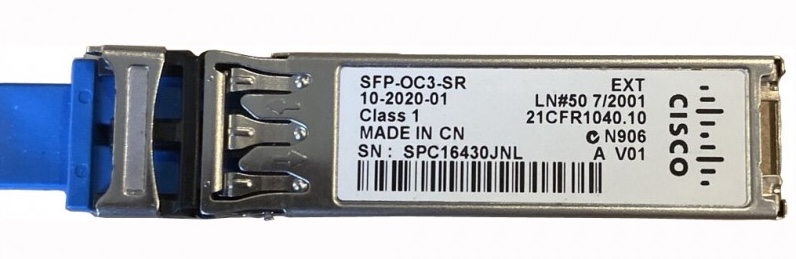
Optical MADI is everywhere in broadcast - OB trucks, broadcast centres, temporary installations. It covers distances that coax can’t, it’s immune to ground loops, and a single fibre carries the same 64 channels as a coax cable. Most MADI-capable equipment implements the optical interface via an SFP cage, which gives you flexibility in connector type and fibre distance - provided you use the right module.
This sounds straightforward. In practice, it causes more problems than it should, because the SFP cage is a standard physical form factor but the signal going through it is not standard Ethernet. Getting this wrong means no audio and no obvious error message to explain why.
What MADI Over Fibre Actually Is
MADI is defined in AES10. The optical variant runs the MADI serial data stream - a 125 Mbps signal - directly over fibre, with no Ethernet framing or IP encapsulation. It is a raw serial optical link. This is an important distinction because most SFP modules are designed for Ethernet or SONET/SDH, not raw serial data.
The physical connection is typically LC duplex - one fibre for transmit, one for receive - using the same SFP cage you’d find on a network switch or router. The similarity ends there.
Single-Mode vs Multi-Mode
The first decision when specifying MADI SFPs is fibre type, which determines wavelength and distance.
Multi-mode (MM) SFPs operate at 850nm or 1310nm and are designed for shorter distances - typically up to 300-550m depending on the fibre grade. Multi-mode fibre is usually identified by an orange or aqua jacket and uses a larger core (50 or 62.5 micron). In an OB truck or a single building, multi-mode is often sufficient and the SFPs are cheaper.
Single-mode (SM) SFPs operate at 1310nm and can cover distances of several kilometres. Single-mode fibre has a much smaller core (9 micron) and is typically identified by a yellow jacket. For permanent installations between buildings, venues connected by pre-installed fibre runs, or any distance beyond a few hundred metres, single-mode is the right choice.
Mixing single-mode SFPs with multi-mode fibre (or vice versa) will not work. The wavelengths, core sizes, and power levels are incompatible.
What to Look for in a MADI SFP
Bit rate compatibility. MADI runs at 125 Mbps. You need an SFP rated for this speed. Many SFPs are designed for Fast Ethernet (100 Mbps), Gigabit Ethernet (1.25 Gbps), or higher. A 100 Mbps SFP is too slow. A Gigabit SFP runs at a different bit rate and will not lock to a MADI signal. You specifically need an SFP rated for 125 Mbps operation.
Receive sensitivity and transmit power. The AES10 optical specification defines acceptable power levels at the receiver. An SFP with insufficient transmit power or poor receive sensitivity may work over short distances but fail unpredictably as cable length or connector losses increase. Reputable MADI SFP manufacturers spec their modules against AES10 explicitly.
MADI-specific designation. Some SFP manufacturers explicitly label modules as MADI-compatible. This is a better starting point than trying to determine from a generic data sheet whether a module will work. The labelling doesn’t guarantee compatibility with every piece of MADI equipment, but it at least indicates the module has been designed with the signal in mind.
Vendor lock-in. Some MADI equipment manufacturers require their own branded SFPs or a validated third-party list. The equipment reads an identification register in the SFP and will refuse to operate if it doesn’t recognise the module. This is common in the IT world and has spread to broadcast hardware. Before purchasing third-party SFPs, check the equipment manufacturer’s documentation or ask their support team directly.
Common Compatibility Issues
Using Ethernet SFPs. This is the most common mistake. A Gigabit Ethernet SFP fits the cage, the link light may come on, and nothing works. The bit rate mismatch means the receiver can’t lock to the signal. If a MADI link isn’t coming up and the SFPs are generic network modules, this is the first thing to check.
Mismatched fibre types. Single-mode SFPs connected to multi-mode fibre will sometimes establish a partial link at short distances due to modal coupling, but reliability degrades quickly and the link will not be stable over any meaningful distance.
Power level mismatch. Two MADI SFPs from different manufacturers with different transmit power levels and receive sensitivities can cause intermittent sync issues, particularly on longer runs or through patch panels with connector losses. If a MADI link is unstable and the fibre itself is fine, measuring optical power levels at the receiver is worth doing.
Incorrect wavelength on bidirectional (BiDi) SFPs. BiDi SFPs use different wavelengths on transmit and receive to carry both directions over a single fibre strand. If you’re using BiDi SFPs, both ends must be a matched pair - the wavelengths must be complementary. Mismatched BiDi pairs are a less common but occasionally painful source of MADI link failures.
Selecting Generic SFPs - What Specs to Look For
If you can’t source a MADI-designated SFP, or you need a cost-effective option in a pinch, generic SFPs can work - but you need to look at the right specs on the data sheet.
The key is finding an SFP whose optical components are designed to operate in the frequency range that includes 125 Mbps. Modules rated specifically for Gigabit Ethernet (1.25 Gbps) are too fast and won’t lock reliably to a MADI signal. What you want is an SFP designed for a lower speed standard that sits closer to MADI’s 125 Mbps.
SONET OC-3 / SDH STM-1 is the most useful indicator. OC-3 runs at 155.52 Mbps - close enough to 125 Mbps that the laser and receiver circuitry in these SFPs operates comfortably at MADI’s bit rate. If a data sheet lists OC-3 or STM-1 support, the SFP has a good chance of working with MADI. Many multi-rate SFPs explicitly list OC-3/STM-1 alongside Fast Ethernet support, and these are often the most practical generic option.
Fibre Channel SFPs are another useful reference point. The optical front-ends in Fibre Channel modules are typically broadband enough to handle 125 Mbps, and many multi-rate SFPs that list Fibre Channel support also cover the OC-3 frequency range. If you’re looking at a generic SFP that lists Fibre Channel compatibility alongside OC-3 or 155 Mbps operation, it’s a reasonable candidate.
What to check on the data sheet:
- Supported bit rates or standards - look for OC-3, STM-1, or explicit 125 Mbps support
- Transmit output power (typically -15 to -8 dBm for multi-mode; -15 to -8 dBm for single-mode short-range)
- Receiver sensitivity (typically better than -23 dBm)
- Operating wavelength matching your fibre type (850nm or 1310nm for MM, 1310nm for SM)
Even with the right specs on paper, it’s worth testing a generic SFP on the bench before relying on it in a production environment. Some equipment is more tolerant of generic modules than others, and optical power levels that look fine on a data sheet don’t always translate to reliable operation through real-world connector and cable losses.
Where equipment enforces vendor lock-in via the SFP identification register, one option is to use an SFP EEPROM programmer - tools like the Ubiquiti SFP Wizard can read the identification data from a vendor-approved module and write it to a generic one, causing the equipment to treat the generic SFP as approved. This works in practice, and is fairly common where approved SFPs are prohibitively expensive or unavailable. It is worth being aware that it is not officially sanctioned by equipment manufacturers and may affect warranty support.
A Practical Note
On OB trucks and temporary installations, it’s worth standardising on a single SFP type and carrying spares. MADI link failures in a live environment are high-pressure situations, and having to diagnose an SFP compatibility issue while a show is about to go on air is not where you want to be. Knowing that every SFP on the truck is the same validated module removes one variable from the troubleshooting process.